
What is an Avatar?
Your unique, verifiable identity across the Hologram ecosystem
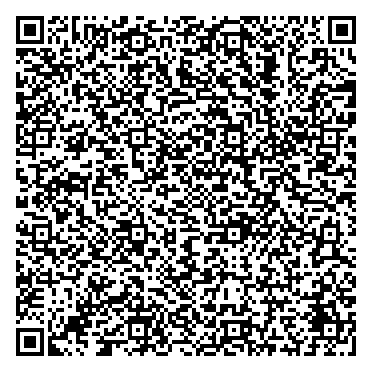
An Avatar is a unique name you choose that becomes your identity across all Hologram services (and any other service that wants to support it). It's similar to a username, but with powerful verifiable credentials backing it up. Pick any unique name that represents you, like @john or @alice_tech You receive a verifiable credential that proves you own this Avatar name Your credential is stored securely on your phone in the Hologram app Your Avatar is more than just a name: it's your verified digital identity Choose your unique Avatar name in the Hologram app Receive a verifiable credential proving ownership Credential stored safely on your device Your Avatar works across all services that support it You're not limited to just one Avatar. Create different identities for various aspects of your life Use a casual Avatar for personal interactions, hobbies, and social connections @john_doe Maintain a professional Avatar for work, business networks, and career opportunities @john.smith.ceo Showcase your creative side with an Avatar for your artistic projects and portfolios @johnny_creates Creating different Avatars helps you maintain privacy and professionalism. Keep your personal life separate from work, and your creative pursuits distinct from both. Each Avatar can have its own set of credentials and connections. Open the Hologram app on your phone and scan this QR code to create your first Avatar and receive your verifiable credential Open the app and use the built-in scanner to scan the QR code Pick a unique name that will become your digital identity Get your verifiable credential stored securely on your device Your Avatar credential is created and verified instantly. No waiting, no approval process—you're ready to go! Point your camera at this QR code Avatars provide unique benefits that traditional usernames can't match Your Avatar is cryptographically yours. No platform can take it away or impersonate you. Control what information you share. Your credentials stay on your device. One Avatar works across all Hologram services and compatible platforms. Others can verify your Avatar is authentic without needing a central authority. Your Avatar lives on your phone, accessible anytime, anywhere. Create as many Avatars as you need for different contexts and purposes. Once created, an Avatar name is permanent to maintain trust and verification. However, you can create new Avatars anytime if you want to use a different name. There's no limit! Create as many Avatars as you need for different purposes—personal, professional, creative, or specialized use cases. Yes! Your Avatar credential is stored locally on your device using industry-standard encryption. Only you have access to it, and it never leaves your phone, even if you explicitly present it to a third party. Third parties cannot reuse the presentation to impersonate you. You can recover your Avatars as long as you enable recovery in the avatar issuer service. You can either protect your Avatar with a password, otp authenticator,... No. Each Avatar name is unique across the Hologram network. Once you claim a name, no one else can use it. This is guaranteed by the decentralized verification system.Think of it like a username, but better
Choose Your Name
Verifiable Ownership
Secure Storage
How Avatars Work
Create Avatar
Get Credential
Secure Storage
Use Everywhere
Create Multiple Avatars for Different Purposes
Personal
Professional
Creative
Pro Tip: Separate Your Digital Lives
Scan to Obtain Your Avatar
Scan QR Code
Choose Your Avatar Name
Receive Your Credential
Instant Verification
Scan with Hologram App
Why Use an Avatar?
True Ownership
Privacy First
Universal Identity
Verifiable Trust
Always With You
Multiple Personas
Frequently Asked Questions
Can I change my Avatar name later?
How many Avatars can I create?
Is my Avatar credential secure?
What happens if I lose my phone?
Can someone else use my Avatar name?